Registration and Enrolment Module: Streamline Clinic Intake
Apr 11, 2026
A clinical director often sees the same pattern at the start of care. A referral arrives by fax or email. A family gets a PDF to print. Someone at the front desk retypes the same details into two systems. A clinician notices a missing consent form just before the appointment. The patient is already anxious, and the team is already behind.
That first touchpoint shapes everything that follows. If intake feels scattered, care feels scattered too.
A strong registration and enrolment module fixes that early friction. It gives staff one place to collect details, verify eligibility, capture consent, assign next steps, and move the right person into the right service without guesswork. In cognitive health, that matters even more because delays at intake can slow assessment, postpone therapy, and create avoidable stress for patients, parents, and providers.
The Digital Front Door to Modern Care
Think about a parent trying to book a child for a cognitive assessment after a difficult meeting at school. They’re juggling work, paperwork, and worry. If your clinic asks them to download one form, email another, wait for a callback, and then repeat the same information on arrival, you haven’t just created admin work. You’ve created doubt.
The same thing happens in adult care. A senior patient may need support from a family member. A rehab client may already be fatigued. A person with memory concerns may struggle with long, unclear paperwork. Intake that feels confusing can make clinical care harder before it even starts.
That’s why I describe the registration and enrolment module as the digital front door. It’s the first organised interaction patients have with your service. It sets the tone for trust, clarity, and speed.
Many clinics start by cleaning up their intake documents. If you’re reviewing your own process, this guide to patient registration forms is a useful reference because it shows what strong form design looks like before you layer in workflow automation.
A good module doesn’t just digitise paper. It orchestrates movement. It collects the right details once, routes them to the right team, and triggers the next action automatically. That could mean sending paediatric consent forms only when the patient is a minor, notifying a clinician that an assessment is ready to assign, or preventing staff from booking a patient into the wrong pathway.
For clinical leaders, this changes the conversation. You stop asking, “Did we get the paperwork?” and start asking, “Is this patient ready for care?”
If you want to see how a more connected care journey can work in practice, the workflow model at https://www.orangeneurosciences.ca/our-solution is a useful reference point for thinking about intake as part of a larger clinical system.
Defining the Registration and Enrolment Module
A registration and enrolment module is best understood as a digital concierge with rules. It welcomes people in, checks what they need, confirms what they’re allowed to access, and sends them to the correct next step.
That sounds simple, but two terms often get mixed together: registration and enrolment. They aren’t the same thing.

Registration means basic entry
Registration is the first step. It usually captures core identity and contact details.
In Canadian doctoral programs, registration serves as a mandatory legal step collecting minimal data, while enrolment provides full privileges like system access via a portal. Research from 2025 says 78% of 12,000 Ontario PhD candidates faced delays due to confusion between these two steps, which shows how costly unclear system design can be in practice (TU Darmstadt).
In a clinical setting, registration might include:
Patient identity details: Name, date of birth, address, emergency contact.
Referral basics: Who referred the patient, why they were referred, and what urgency level applies.
Initial consent signals: Whether the patient agrees to be contacted or to receive intake instructions.
At this stage, the system is saying, “We know who you are.”
Enrolment means access to a defined service
Enrolment happens after the first capture. It grants the person access to a specific pathway, program, assessment, or treatment plan.
For a cognitive health clinic, enrolment could mean assigning a patient to a memory screening workflow, a child learning profile, a concussion follow-up pathway, or a therapy module that matches the referral reason. This step often needs validation. Age, referral type, consent status, payer rules, and clinician approval may all matter.
A reliable system separates “we have your details” from “you are cleared for this service.”
That distinction matters because it protects both patients and staff. If you treat registration and enrolment as one blurry process, people get stuck. Staff manually patch the gaps. Patients wait.
A practical healthcare example
A family might complete a short online registration after a paediatrician referral. The clinic then reviews the referral, confirms guardian consent, checks which cognitive pathway fits best, and enrols the child into the appropriate assessment and follow-up sequence.
That’s cleaner than sending every family the same packet and hoping someone sorts it out later.
The same logic applies in adult neuropsychiatry. A patient can register interest in a screening process without immediately gaining access to a full programme. Once the clinician confirms suitability, enrolment provides access to the proper care workflow.
If you’re mapping these stages in your own service design, the operational model at https://www.orangeneurosciences.ca/how-we-work offers a useful way to think about controlled progression from intake to active care.
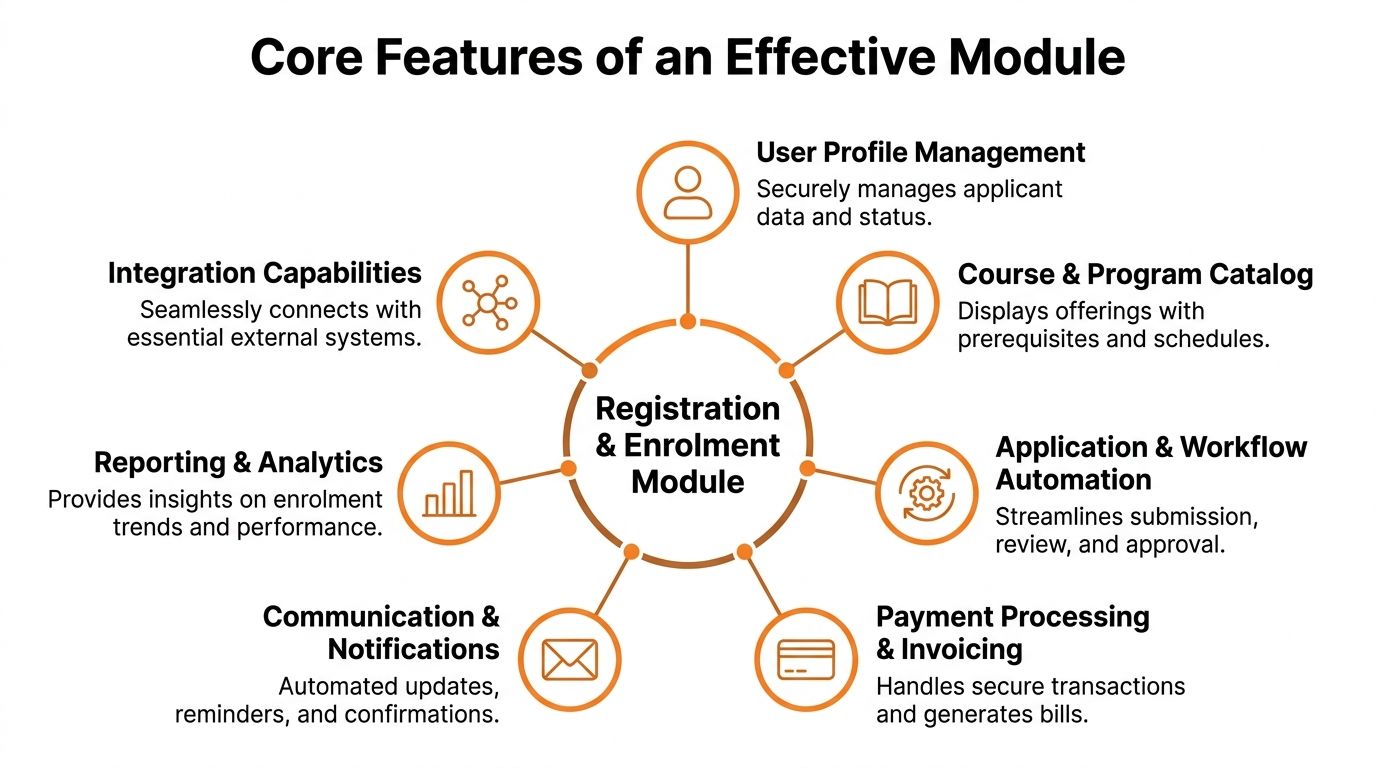
Exploring Core Features of an Effective Module
When leaders ask what makes a registration and enrolment module “good,” I usually answer with a simple test. Does it reduce effort for staff while reducing uncertainty for patients?
If the answer is yes, the module usually has a strong set of core features working together instead of isolated tools doing partial jobs.
Intake that adapts to the person
Static forms create noise. Dynamic intake forms create relevance.
A well-built module changes what it asks based on earlier responses. If a patient is under age, the system can prompt for guardian details. If the referral is for cognitive decline, it can ask about language preference, caregiver involvement, or prior testing. If the patient is an adult seeking return-to-work support, the pathway can look different.
This improves data quality because patients only see questions that apply to them.
Consent capture that holds up under scrutiny
Consent is not a box to tick at the end. It’s part of safe care.
Your module should record what was presented, who agreed, when they agreed, and what version of the consent language was used. In cognitive health, that can include consent for assessment, consent for caregiver communication, and consent for data use within approved clinical or research workflows.
A practical example matters here. A parent starts a form for a child. The date of birth triggers a guardian consent requirement before the booking can proceed. The module prevents a compliance gap before anyone on staff has to catch it manually.
Practical rule: If a missing consent can derail care later, the module should stop the process earlier.
Identity, eligibility, and access control
A registration and enrolment module should verify more than names. It should check whether the person belongs in the pathway they’re trying to enter.
That can include referral criteria, programme fit, insurance or funding checks, and role-based access. A clinician might see assessment readiness and clinical notes. A parent may only see intake tasks and child-facing appointments. An administrator may handle scheduling but not treatment details.
Here, many teams underestimate system design. Good access rules don’t slow people down. They remove clutter and reduce risk.
Scheduling that follows readiness
Many organisations schedule too early. They book first and clean up paperwork later.
An effective module flips that sequence when appropriate. It can release scheduling only after registration is complete, consent is captured, and the relevant pathway has been approved. That reduces rescheduling, no-shows, and awkward calls to families about missing documents.
For clinicians, that means the diary reflects patients who are ready.
Workflow automation that removes handoffs
The strongest modules act like an organised coordinator. Once a trigger happens, the next action follows automatically.
That may include:
Sending reminders: Patients receive the right instructions at the right point.
Routing exceptions: Missing referral details go to admin review instead of sitting unnoticed.
Assigning tasks: A clinician sees that a case needs triage, not just that a form exists.
Provisioning next steps: Once approved, the patient enters the correct assessment or therapy sequence.
In well-established Canadian systems, demographic breakdowns such as 52% female and 15% SEN are used to inform equitable access rules within the enrolment module, and this data-driven approach has helped reduce administrative costs by 18% through more automated, programme-specific enrolment and compliance handling (KPI Partners).
That lesson transfers well to healthcare. The point isn’t to collect more data than you need. The point is to use necessary data responsibly so the system can present the right pathway, support needs, and access rules.
Reporting that supports operational judgement
A useful module doesn’t just process transactions. It shows where friction lives.
Here’s a simple way to think about reporting priorities:
Operational question | Module signal |
|---|---|
Are people getting stuck before completion? | Form abandonment or incomplete intake records |
Are clinicians waiting on paperwork? | Cases pending consent or eligibility review |
Are families confused about next steps? | Repeated reminder triggers or support requests |
Are pathways too broad? | Manual reassignment after enrolment |
If you’re evaluating pathway design in cognitive care, the practical examples at https://www.orangeneurosciences.ca/guide/cognitive-assessment-online can help you think through how intake data should support downstream assessment decisions.
Smooth Integration with Your Existing Systems
Most intake problems aren’t caused by one bad tool. They’re caused by good tools that don’t talk to each other.
A clinic may have an EHR for records, a scheduling platform for appointments, a billing process elsewhere, and a separate assessment environment. If staff must move data across those tools by hand, errors multiply. So does delay.
The module as the central hub
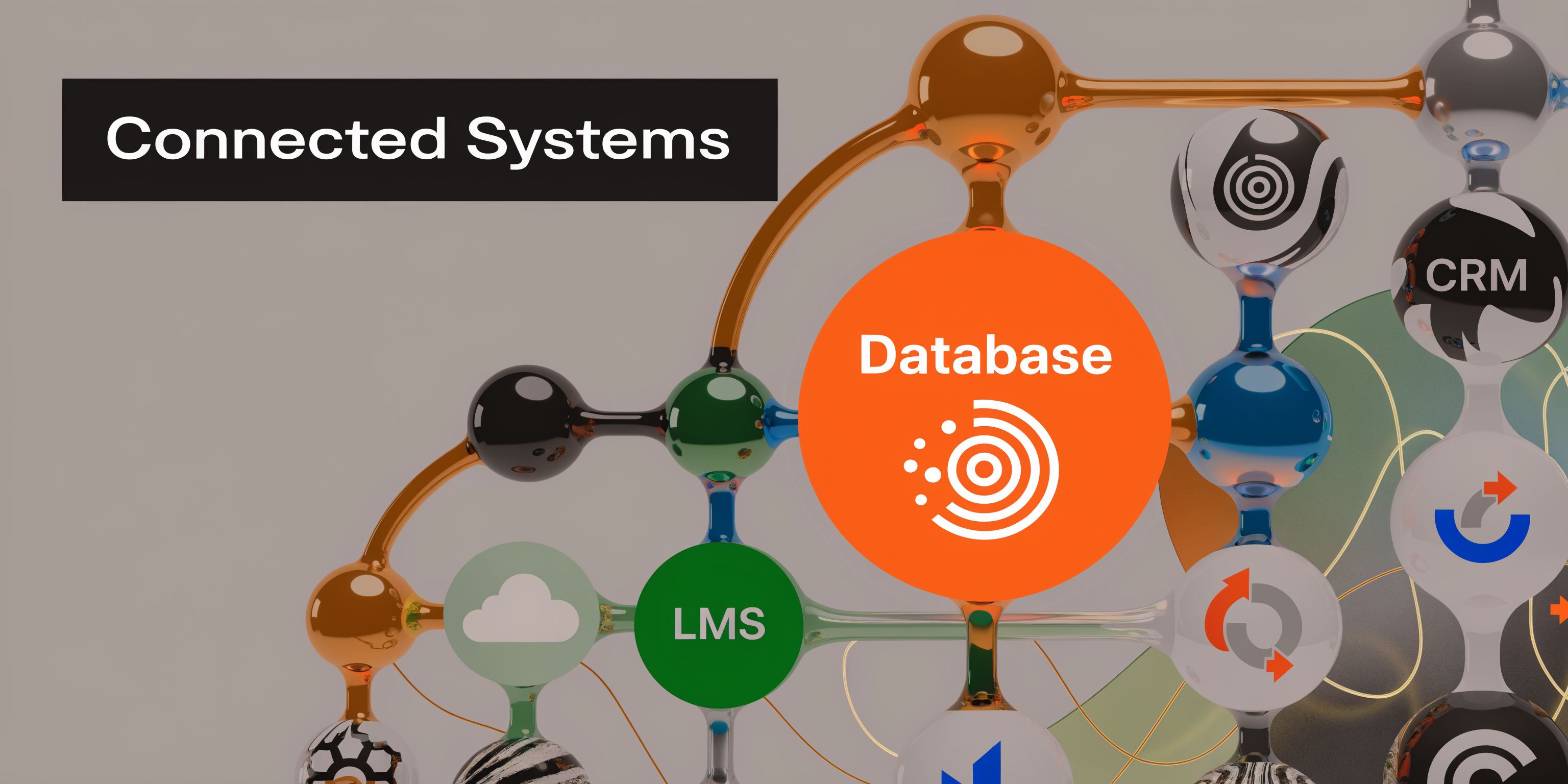
I encourage clinical teams to stop seeing the registration and enrolment module as “the forms system.” It should function more like a hub.
Validated patient demographics should flow into the record system. Scheduling status should update without duplicate entry. Service eligibility should shape what gets assigned next. If a patient finishes intake, the next system should know that without a staff member sending an email.
That’s what creates continuity.
What connected workflows look like in practice
In healthcare, one common pattern is this:
The patient registers with core demographic and referral information.
The module checks readiness by confirming missing fields, required approvals, and consent.
The schedule opens only when the intake stage is complete.
The assessment or therapy platform receives the enrolment event and assigns the correct pathway.
The clinician dashboard reflects status so staff can act without chasing updates.
This is especially helpful in cognitive care, where referrals may come from schools, family physicians, rehab teams, insurers, or specialists. The module keeps the entry point organised even when the referral sources are not.
Why architecture matters
Modern Registration and Enrolment Modules use RESTful API architecture, which supports smoother integration and has been associated with a 25% faster enrolment completion rate, averaging 4.2 minutes versus 5.6. In healthcare-oriented pilots at Ontario universities, the same architecture supported customised hooks for cohort enrolment and reduced administrative delays by 40% (York SIS REM).
That matters because “integration” isn’t just a technical nice-to-have. It changes the day-to-day experience.
For administrators: Less re-entry, fewer handoffs, fewer missed triggers.
For clinicians: Better readiness visibility before the visit.
For patients and families: Fewer repeated questions and fewer confusing status updates.
The best integrated workflow feels quiet. Staff stop talking about the system because the system stops interrupting the work.
Where this usually breaks down
Integration projects often fail for boring reasons, not dramatic ones. Field names don’t match. One team assumes another team owns the trigger logic. Nobody decides which system is the source of truth for consent status.
That’s why the design phase matters as much as the API layer. Before connecting anything, decide:
Which system owns identity
Which system owns appointment status
Which system owns enrolment state
Which system receives final assessment outputs
If you’re thinking through those handoffs in a provider setting, https://www.orangeneurosciences.ca/healthcare-providers is a useful reference for the kinds of workflows clinicians often need to support.
Your Implementation and Rollout Checklist
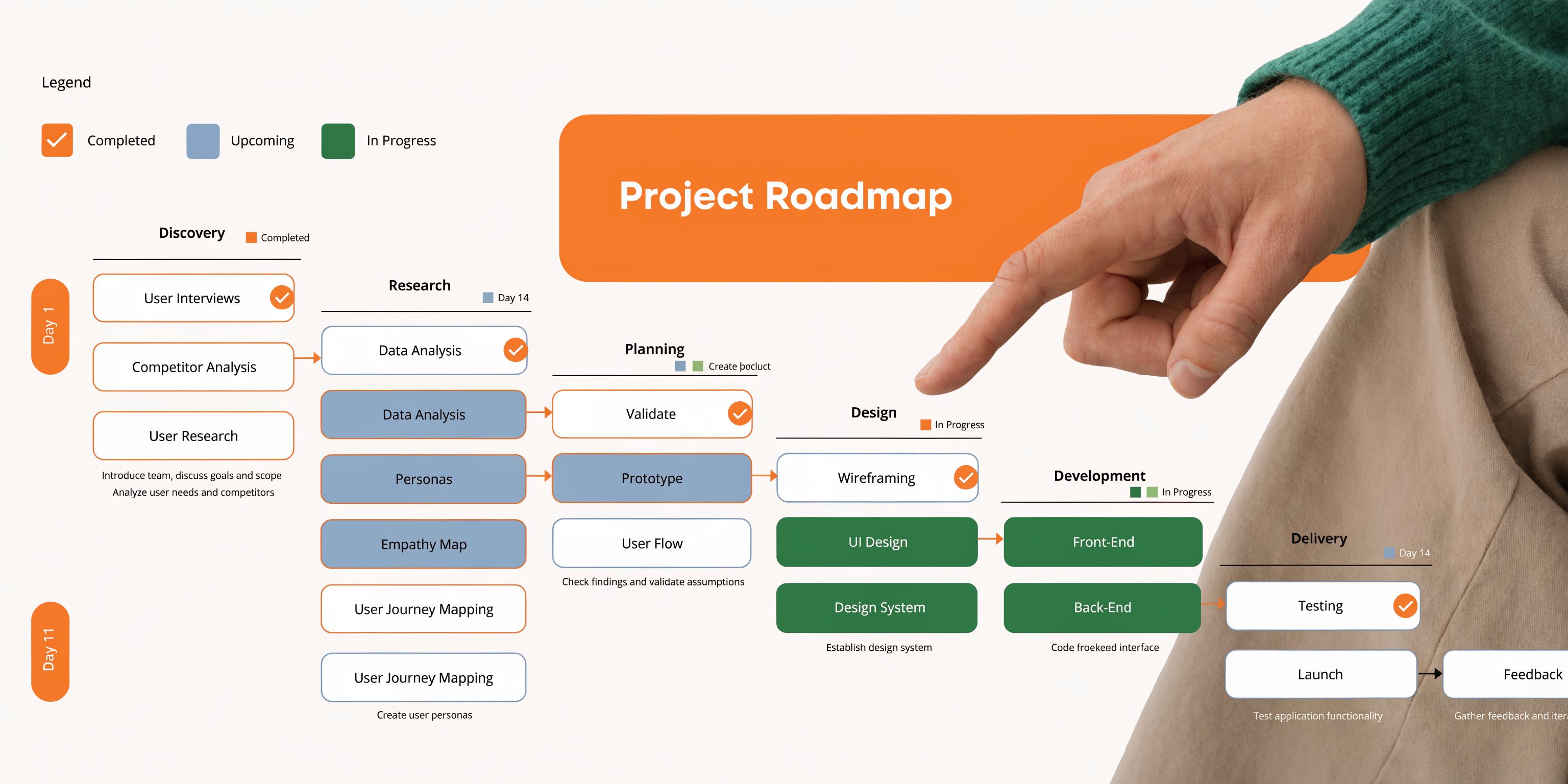
A registration and enrolment module succeeds when the rollout is treated like a clinical operations project, not just a software install. Teams get into trouble when they configure screens before they define workflows.
Start with the patient journey as it happens. Then build the system around it.
Phase one with workflow discovery
Map what happens now, not what the policy manual says happens.
Sit with front-desk staff. Watch how referrals arrive. Ask clinicians where intake errors create clinical risk. Review every spreadsheet, paper form, and email template currently used to move someone from referral to active service.
Document points like these:
Entry channels: Referral form, phone call, website form, school request, insurer request.
Decision points: Who reviews suitability, who checks consent, who approves service assignment.
Failure points: Missing signatures, duplicate records, delayed booking, unclear ownership.
Special pathways: Minors, caregiver-supported adults, urgent referrals, research participants.
A good discovery phase often reveals that the software problem is really a workflow problem.
Phase two with configuration and security
Once the path is clear, configure the module to match it.
That includes form logic, role permissions, status labels, notifications, and exceptions. Keep labels plain. “Awaiting guardian consent” is better than “pending administrative completion.”
Security belongs here, not as a final checklist item. Define who can see what. Decide what gets logged. Review how consent is stored and how changes are tracked. Make sure mobile completion doesn’t create unsafe shortcuts.
A practical design principle helps here. If a task would feel risky on paper, it’s risky in software too.
Phase three with integration and testing
Connect your key systems only after your process rules are stable enough to test.
Use realistic scenarios instead of abstract test scripts. For example:
Scenario | What to verify |
|---|---|
Parent registers a child for assessment | Guardian fields appear, consent is required, correct pathway is assigned |
Adult patient lacks required referral detail | Case routes to review instead of auto-enrolment |
Clinician approves service fit | Appointment and next-step tasks become available |
Staff member with admin role logs in | Scheduling tools are visible, restricted clinical details are hidden |
Don’t stop at technical success. Ask staff whether the process makes sense under pressure.
Phase four with training and go-live support
Training fails when it focuses only on buttons. Staff need to understand why the workflow changed.
Run role-based training. Front-desk teams need one view. Clinicians need another. Patient-facing guidance should use simple language and screenshots. Caregivers should know what to expect if they stop midway and return later.
Train for exceptions, not just the happy path. That’s where confidence is built.
During go-live, assign clear owners for issue triage. Someone should own form issues. Someone should own permissions. Someone should own integration failures. If everyone owns everything, nobody owns anything.
Phase five with optimisation after launch
The first version is rarely the final version.
Review incomplete intakes, support requests, bottlenecks, and manual workarounds. If families repeatedly ask the same question, the wording is probably unclear. If staff keep bypassing a step, the workflow is probably misaligned with reality.
Use short review cycles. Small fixes made quickly do more for adoption than a large “phase two” promised months later.
A practical post-launch checklist looks like this:
Review dropped-off forms: Find where users quit and simplify that point.
Audit permission sets: Confirm people only see what they need.
Check exception volume: Too many manual reviews means the logic may be too rigid.
Update guidance: Rewrite help text based on user questions.
Meet with clinicians: Confirm the module is improving readiness, not just digitising intake.
Tracking Success and Avoiding Common Pitfalls
A registration and enrolment module shouldn’t be judged by whether it launched. It should be judged by whether it makes intake more reliable, more readable, and more clinically useful.
Good teams watch the right signals early. They don’t wait for complaints to tell them where the workflow is breaking.
Key Metrics
Educational systems offer a useful lesson here because they track intake operations closely. At York University, success is monitored through weekly snapshots including enrolment count, percent class filled with a target above 85%, and waitlist counts. In 2025, over 45,000 undergraduates used the system, and 95% of priority users achieved successful first-attempt enrolments. The same environment also uses real-time debt checks to block students with outstanding balances over $1,500 in one category, helping prevent large annual losses (York Registrar guide).
In healthcare, you can apply the same management discipline without copying the academic measures directly.
Track questions such as:
Are people finishing intake?
How long does it take staff to move a case from referral to readiness?
Where are patients getting stuck?
How often does a clinician receive an incomplete case?
Which enrolment rules trigger manual review most often?
A simple internal dashboard can group metrics into operational, patient, and clinical categories.
Category | Useful signal | Why it matters |
|---|---|---|
Operational | Intake completion status | Reveals friction before scheduling |
Patient experience | Support requests during intake | Shows where instructions are unclear |
Clinical readiness | Cases missing consent or referral detail | Protects appointment quality |
Workflow quality | Manual overrides after enrolment | Exposes rule or pathway mismatch |
Common pitfalls I see in real rollouts
The first is overly complex forms. Teams try to capture every possible detail at the first touchpoint. Patients quit, staff chase missing information, and everyone blames adoption. Usually the form is the issue.
The second is weak rollout communication. If clinicians don’t know what changed or why, they’ll keep using old workarounds. If families don’t understand the sequence, they’ll call for updates that the system was supposed to make unnecessary.
The third is scope creep. A sensible intake project becomes a full digital transformation effort. Timelines slip because every department wants one more feature.
The fourth is neglecting ongoing training. New staff arrive. Old habits return. Exceptions pile up. A strong module can still produce poor outcomes if no one maintains operational discipline.
How to respond before problems spread
Use practical responses, not big rescue projects.
For complex forms: Use conditional logic so people only see relevant questions.
For poor adoption: Give each role a short explanation of what changed in their daily work.
For scope creep: Define what the first release must do well, then protect it.
For training drift: Build refreshers into onboarding and review common exceptions monthly.
If your team keeps creating side processes, the module isn’t failing. It’s being told, very clearly, where it doesn’t fit the operational workflow.
Success comes from paying attention early. The strongest implementations don’t just collect data. They use it to simplify the next version of the process.
Building Your Future Ready Practice Today
A registration and enrolment module isn’t just an admin upgrade. It’s infrastructure for better care.
When intake is organised, patients feel guided. Staff stop re-entering the same information. Clinicians get cleaner handoffs. Leaders gain a clearer view of readiness, risk, and workflow performance. In cognitive health, those improvements matter because delays and confusion at the front end often ripple into assessment timing, therapy access, and family confidence.
The most useful way to think about this module is simple. It’s the system that decides whether your front door feels calm or chaotic.
The clinics that get this right don’t chase technology for its own sake. They build a process that respects the patient’s time, protects the clinician’s attention, and gives operations teams a structure they can manage. That’s what makes a practice more scalable and more resilient.
If your current intake process depends on PDFs, inboxes, manual checking, and staff memory, there’s a better way to run the first stage of care. Start with the workflow. Clarify the distinction between registration and enrolment. Design around real people. Then connect the module to the systems your team already relies on.
If you're ready to modernise intake and connect it to faster, better-informed cognitive care, visit Orange Neurosciences or reach out to discuss how a customized registration and enrolment workflow can support assessment, therapy, and provider efficiency in your setting.

Orange Neurosciences' Cognitive Skills Assessments (CSA) are intended as an aid for assessing the cognitive well-being of an individual. In a clinical setting, the CSA results (when interpreted by a qualified healthcare provider) may be used as an aid in determining whether further cognitive evaluation is needed. Orange Neurosciences' brain training programs are designed to promote and encourage overall cognitive health. Orange Neurosciences does not offer any medical diagnosis or treatment of any medical disease or condition. Orange Neurosciences products may also be used for research purposes for any range of cognition-related assessments. If used for research purposes, all use of the product must comply with the appropriate human subjects' procedures as they exist within the researcher's institution and will be the researcher's responsibility. All such human subject protections shall be under the provisions of all applicable sections of the Code of Federal Regulations.


© 2026 by Orange Neurosciences Corporation